Custom Fonts can be imported in a number of ways :
1: http://www.wpbeginner.com/wp-themes/how-add-google-web-fonts-wordpress-themes/
2: http://www.wpbeginner.com/plugins/how-to-add-awesome-typography-in-wordpress-with-typekit/ .
3: @font-face https://premium.wpmudev.org/blog/custom-fonts-css/
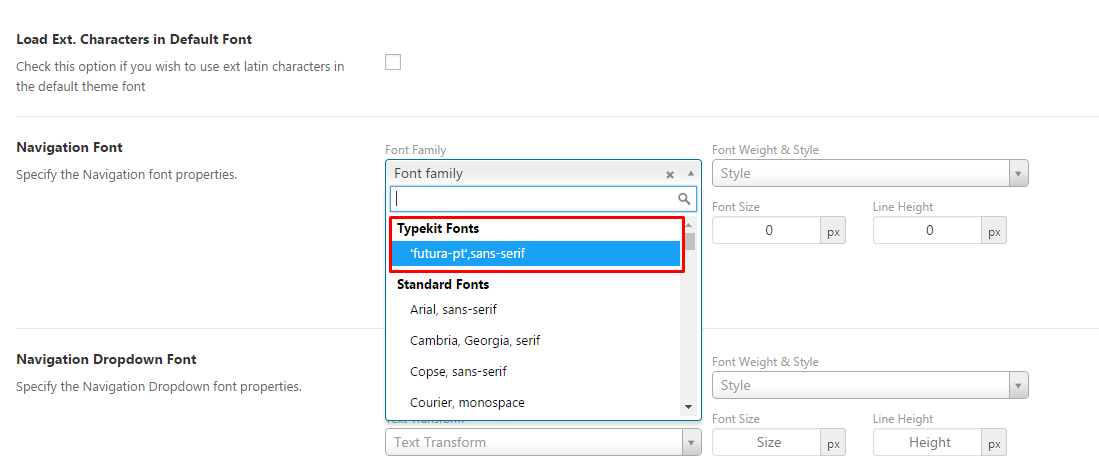
What this Article describes is how to add that font to the Salient Theme Options Panel -> Typography Section so users dont have to write up custom css for each element they want to use the new font on .
Assuming you have the TypeKit Fonts Plugin setup and working with url earlier provided.
Will work with @font-face as well .
Add this to your Child Theme Functions.php file or use Code Snippets Plugin to add below code :
function salient_redux_custom_fonts( $custom_fonts ) {
    return array(
        'Custom Fonts' => array(
             'futura-pt,sans-serif' => "Futura PT"
        )
    );
}
add_filter( "redux/salient_redux/field/typography/custom_fonts", "salient_redux_custom_fonts" );
Which should make your custom font show up like this :